









A PC cooler has one rude job: move heat away before your expensive parts slow down. For many U.S. gamers, streamers, editors, and workstation owners, liquid cooling sounds like the premium answer, but the smarter choice depends on heat load, case space, noise targets, budget, and how long your PC stays under pressure. The core search intent is simple: air cooling wins for value, easy setup, and long-term trust, while an AIO or custom loop makes sense when you run hot CPUs, long renders, heavy overclocks, or a showpiece case where radiator placement helps the whole build breathe.
That choice also affects where you spend money. A $130 saved on cooling can become more RAM, a better SSD, or a stronger graphics card, which may matter more in real games. For builders comparing parts, PC build cooling choices should start with the workload, not the photo of the finished rig. Intel explains that CPU heat must move from the chip into a cooler, then away from the system through air or radiator fans, which is why cooler design and case airflow matter together.
What the Cooler Is Actually Fighting
Heat is not an abstract spec on a box. It shows up as fan noise during a late-night gaming session, lower boost clocks during a long export, or a tower case that turns into a warm little space heater under your desk. The cooler is not fighting the sticker wattage alone. It is fighting your habits.
Why CPU cooling starts before the cooler
CPU cooling begins with the processor, but it does not end there. Intel’s own guidance breaks the path into stages: heat leaves the CPU, passes through the integrated heat spreader and baseplate, then moves into heat pipes or coolant before fans push it away. That means a bad mount, poor thermal paste contact, blocked intake, or cramped top panel can ruin a cooler that looked perfect in reviews.
This is where many first-time builders get tricked. They buy a bigger cooler before they check the case. A tall dual-tower air unit may collide with RAM. A 360 mm radiator may fit only in the front, where it feeds warmer air to the GPU. In a gaming PC, that trade can matter because the graphics card often throws more heat into the case than the processor.
A real example: someone building around a Ryzen 7 or Core i7 for 1440p gaming may not need the largest radiator on the shelf. A strong tower cooler in a mesh case can keep the CPU stable while leaving more budget for the GPU. The non-obvious part is that the “weaker” cooler can create the better gaming PC when the money lands in the part that drives frame rate.
The case decides more than marketing admits
Case airflow is the quiet judge in this debate. You can install an expensive AIO cooler and still get poor results if the case has a glass front, thin side vents, and a radiator choking against a dust filter. You can also install a midrange air tower in a high-airflow case and get calm fan curves that feel far better than the spec sheet suggests.
Noctua’s cooler buying guide points buyers toward performance, noise needs, looks, and compatibility checks across CPU, motherboard, case, and RAM. That list sounds plain, but it is where good builds are made. The cooler is one part of a pressure system. Air needs a clear way in, a clear way out, and enough open space near the heat source.
For a U.S. builder shopping at Micro Center, Best Buy, Amazon, or Newegg, this means reading the case manual before buying the cooler. Check CPU cooler height. Check radiator length and thickness. Check whether a top radiator leaves room above the motherboard. That boring step can save an evening of scraped knuckles and returned parts.
Where Liquid Cooling Earns Its Place
A radiator loop earns its keep when the CPU dumps heat for long stretches and the case can place that heat where it leaves cleanly. That is why the better question is not “which is cooler?” It is “which one handles my worst hour without turning the PC into a leaf blower?”
Long workloads change the answer
Short gaming bursts and long production loads do not stress a cooler the same way. A 20-minute match, a browser full of tabs, and Discord in the background are not the same as a 90-minute 4K export or a CPU render that runs while you sleep. In long loads, radiator size starts to matter because heat has more surface area to spread across.
Tom’s Hardware, in its 2026 cooler testing guide, separates air and AIO picks and notes that AIO units suit high-end CPUs when users want strong performance while keeping noise down. That does not mean every gamer needs one. It means the water-based option has a clear lane: hot chips, long pressure, and a case that can mount the radiator well.
Think about a creator in Texas editing wedding footage on a Core i9-class CPU in a warm upstairs room. That system may run heavy exports for hours. A 280 mm or 360 mm AIO cooler mounted at the top can move CPU heat out of the case instead of dumping it near the GPU and motherboard. In that setting, the premium is not vanity. It buys steadier behavior.
Noise can improve, but not always
The common belief is simple: water means quieter. It can. It is not a law.
MSI’s 2026 cooling guide makes a useful point that a high-end air cooler can be quieter at idle than an AIO because the pump adds its own hum, and smaller radiators can force fans to spin faster under heat. That is the part many buyers miss. Silence is not only about peak temperature. It is about the sound profile your ears notice at the desk.
A large radiator with slower fans can sound smooth under load. A cheap 120 mm AIO can sound worse than a good tower cooler because it lacks surface area. The pump may add a faint tone that some people hear through headphones during quiet work. So the premium route needs care: avoid tiny radiators for hot CPUs, mount the pump correctly, and set fan curves with patience.
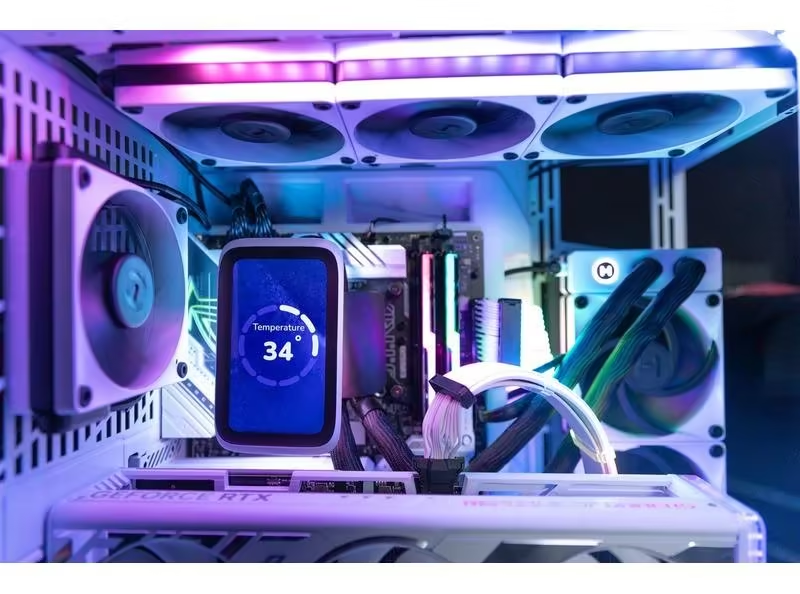
For show builds, though, the visual side is real. A clean water block leaves the motherboard area open. RGB fans and screens can match a white case or blacked-out tower. That does not improve frame rate, but PC building has always had a pride element. You look at the machine every day. That counts too, as long as you know what you are paying for.
Why Air Cooling Still Wins More Builds Than People Expect
Air cooling looks old-school because it is honest. A heatsink, heat pipes, and fans do not feel exotic. Yet that simple design is why it stays so strong for gaming PCs, family workstations, and first builds. Fewer moving parts can be a feature, not a lack of ambition.
Value is not the same as cheap
A good dual-tower air cooler is not the budget fallback. It is often the adult choice. Kingston notes that air setups tend to cost less, install more easily, and need less maintenance than water-based systems. That matters for people who want a fast PC but do not want the cooling system to become a side hobby.
The money difference is often large enough to change the build tier. If your cooler choice saves $70 to $150, that can help move from a 1 TB SSD to 2 TB, from 32 GB memory to faster 32 GB, or from a weaker graphics card to a better one during a sale. For most U.S. gamers, that upgrade will feel more obvious than a few degrees on the CPU.
Here is the counterintuitive part: the cooler that looks less premium may create the more premium ownership experience. No pump noise. No radiator orientation puzzle. No fear, fair or not, about fluid inside the case. You clean dust, check fans, and keep playing.
Reliability has its own kind of speed
A PC that is easy to service gets fixed sooner. That sounds small until you are troubleshooting before work or before a weekend raid. With air cooling, the visible failure point is usually the fan. Replace the fan, clean the fins, remount if needed, and you are back.
An AIO cooler has more hidden behavior. The pump can age. Air can collect in the wrong spot if mounted poorly. Tubes may limit radiator placement. None of this means modern AIO units are unsafe. MSI says factory-sealed AIO coolers are built and tested to reduce leak risk, while custom loops need more hands-on care. Still, hidden failure is harder for a normal builder to read.
That is why air coolers are strong for PCs that must stay dependable for years. A student PC, a work-from-home tower, a family gaming rig, or a small business editing machine may not need a cooler that wins a chart. It needs a cooler that does its job every day with little drama.
For readers planning future upgrades, budget-friendly PC performance planning matters more than chasing the most dramatic cooling style. Buy the cooler that leaves your next upgrade path open.
Matching the Cooler to the Build You Actually Own
The best cooler is the one that fits your chip, your case, your room, and your patience. That sounds less exciting than picking a winner, but it keeps you from building someone else’s PC. Your desk, games, weather, and workload are the truth.
Gaming rigs need balance, not bragging rights
For a high-refresh 1440p gaming PC, the GPU usually deserves first claim on the budget. A solid air tower can handle many Ryzen 5, Ryzen 7, Core i5, and Core i7 gaming setups when the case airflow is clean. The CPU may spike, but games often load the graphics card harder for longer.
A more demanding build changes the math. Pair a hot flagship CPU with a top-end GPU in a glass-heavy case and you may want a 280 mm or 360 mm AIO cooler. Not because water is magic. Because moving CPU heat straight through a top radiator can stop the middle of the case from becoming a heat pocket.
The non-obvious move is to plan fan direction before buying parts. Front intake, top exhaust, rear exhaust is common for good reason. A front radiator can lower CPU temps but warm the GPU. A top radiator may raise CPU temps a touch but help the graphics card breathe. For many gamers, the second trade is better.
Small cases punish lazy choices
Small-form-factor PCs make the debate sharper. A tall air cooler may not fit. A radiator may fit only with short graphics cards. Cable bend, motherboard heatsinks, RAM height, and side-panel clearance all become part of the cooling decision.
This is where the phrase “high performance” can mislead buyers. A compact 12-liter build with a hot CPU and GPU is not the same as a roomy mid-tower. You may need a low-profile air cooler, a 240 mm AIO, undervolting, or a less power-hungry chip. The smartest SFF builders do not chase the biggest cooler. They lower heat at the source.
Undervolting is the quiet trick here. A careful voltage cut can drop temperature and noise with little or no real-world performance loss, depending on the chip. That may beat spending more on a cooler. It feels backward, but reducing waste heat is often cleaner than fighting it after the fact.
For people building around shared spaces, quiet home office PC setup deserves as much thought as raw benchmark charts. A PC that sounds calm during calls, homework, or late gaming feels faster because it bothers you less.
Conclusion
Cooling should be chosen like tires, not like jewelry. The right pick depends on load, space, noise, budget, and how much maintenance you will accept after the excitement fades. Air remains the smart default for many gaming and work PCs because it is cheaper, easier to install, and simple to own.
A radiator-based system makes sense when the CPU runs hot for long sessions, when the case supports clean radiator placement, or when the build’s look matters enough to pay for it. The mistake is treating liquid cooling as an automatic upgrade instead of a tool with a clear use case.
The smartest Desktop PC Builds begin with the heat path: CPU to cooler, cooler to case, case to room. Match that path to your real workload and you will spend less, hear less noise, and avoid the regret that comes from buying for photos instead of daily use. Build for the machine you will live with.
Frequently Asked Questions
Is an AIO cooler worth it for a gaming PC?
It is worth it for hot CPUs, long gaming sessions, heavy streaming, or builds where a top radiator improves heat exhaust. For midrange gaming PCs, a quality air cooler often gives better value and leaves more budget for the graphics card.
What size radiator should I choose for a high-end CPU?
A 280 mm or 360 mm radiator is the safer target for high-end CPUs under long loads. A 120 mm radiator is rarely a good match for hot modern chips because the limited surface area can create more fan noise.
Does air cooling last longer than an AIO cooler?
It often has a longer practical life because the design is simpler. Fans can be replaced, heatsinks do not wear out, and failure is easy to spot. An AIO cooler adds a pump, sealed tubing, and radiator placement concerns.
Can a big air cooler block RAM slots?
Yes, large dual-tower coolers can cover tall memory modules or make RAM changes annoying. Check cooler clearance, RAM height, and motherboard layout before buying. Low-profile memory can solve the issue in many full-size builds.
Is a custom loop better than an AIO cooler?
A custom loop can cool more parts and look cleaner, but it costs more and needs maintenance. An AIO cooler is easier because it arrives sealed and ready to mount. Most builders should avoid custom loops unless they enjoy upkeep.
Which cooling type is safer for beginners?
Air is the safer starting point for most beginners. Installation is less tense, fewer parts can fail, and the cooling path is easy to understand. AIO units are not hard, but radiator placement and pump orientation add more decisions.
Does better case airflow matter more than the CPU cooler?
Bad airflow can weaken any cooler. A strong cooler still needs fresh intake air and a clean exhaust path. Mesh-front cases, sensible fan direction, and dust control often improve noise and temperature more than buyers expect.
Should I upgrade my cooler before upgrading my CPU?
Check current temperatures first. If your CPU already stays cool under your heaviest workload, the cooler may not need replacement. A hotter new CPU, smaller case, or noise problem is a better reason to upgrade cooling.